
If items in a saved or finalised sale are refunded or voided, you may want to inform the kitchen that they no longer need to be produced.
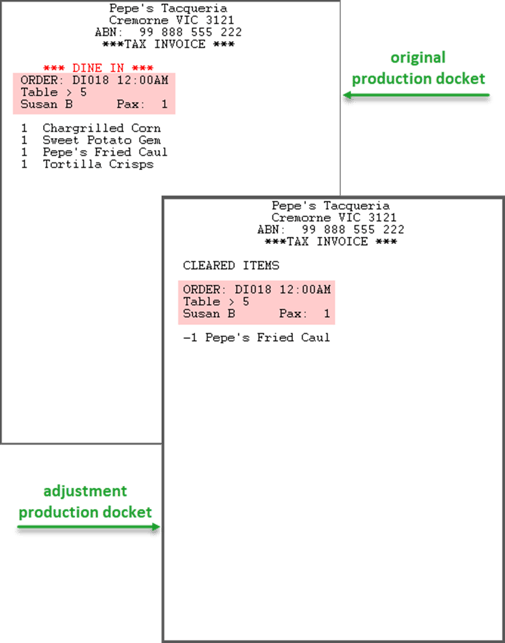
The POS will prompt the staff member to decide if an adjustment docket should be issued to the production printer(s).
Prerequisites
This functionality is only available to businesses with Polygon POS v 2026.1.2 or later in store utilising a Production Server to handle printing.
The Notification Prompt?
The POS will prompt to send cancelled or refunded items to the kitchen with the following message:
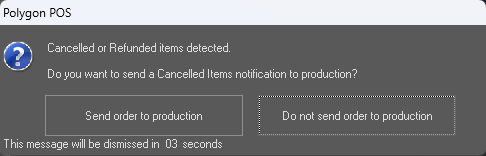
This prompt is presented when:
- the clear item button is used to remove an item from a saved sale
- the clear sale function on the pay screen is used with a finalised sale
- one or more items are refunded from a finalised sale
The Adjustment Docket
The adjustment docket will include all details required to match with the original production docket:
- order number / sale type
- sale identifier (table number, customer name, member name)
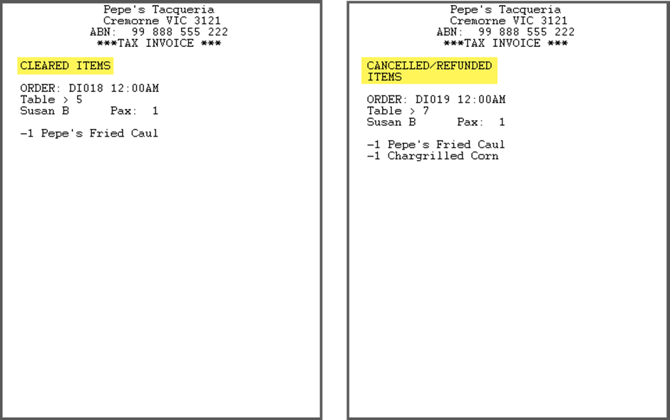
The adjustment docket will also indicate the trigger method:
- cleared items
(the clear item button) - cancelled/refunded items
(the clear sale button, or refund function)
The next article in this series is:
Article Change Log
| Date | Record of Changes | Author |
|
May 2026 |
First publication of this article. |
S Black |