
Data Collection and Verification
Paying Different Stores into Different Bank Accounts
Summary
Redcat Pay is an integrated end-to-end payment solution that enables hospitality businesses to seamlessly accept and manage transactions across every channel—POS, web, app & kiosk.
With support for all major payment methods, and built-in fraud protection, it delivers a fast and secure consumer experience. At the same time, centralised controls, automated settlement, and enhanced reconciliation simplify operations for both corporate and partner entities, providing a single, transparent view of performance across the entire business.
It is available to Redcat customers in Australia, New Zealand, and the UK.
The Product Overview article for Redcat Pay is here.
Onboarding with Redcat Pay
As part of the setup process for Redcat Pay you will need to provide information on your business, decision makers, and bank account in accordance with government mandated collection and verification of information to adhere to payment industry regulations.
This process forms a protective layer to mitigate fraud and AML/CFT (anti-money laundering and counter-terrorism financing) risks.
Onboarding via Invitation
An email will be issued to the contact details provided to Redcat. The email contains a secure link that will allow you to enter all the required information.
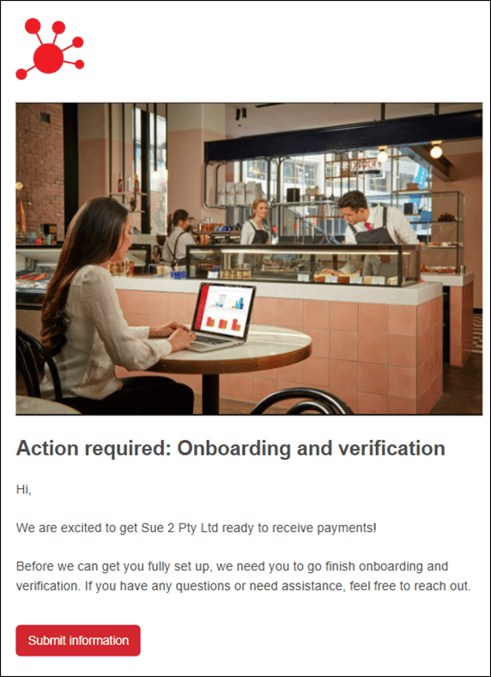
- check that that name included in the email matches your business
- use the Submit information button to start the process
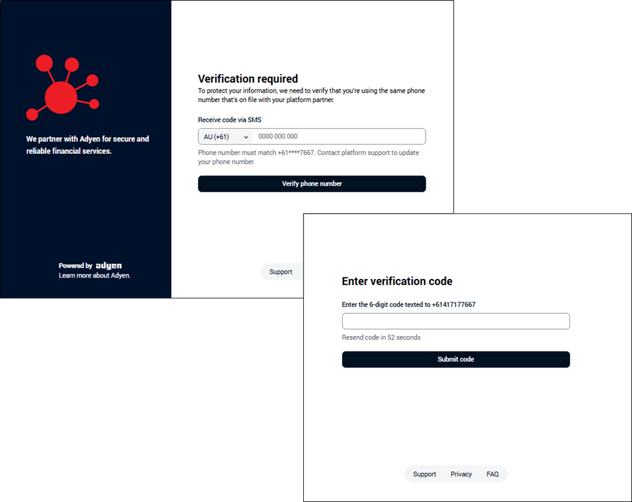
- the process is secured by multi-factor authentication, and you will need to verify using the same mobile phone number you provided to Redcat
- enter the correct phone number and use the Verify phone number button
- enter the verification code received on the phone and use the Submit Code button
Data Collection and Verification
The information required may vary according to your business type but all types will require details about your legal entity, responsible individual(s), support contact details and your bank account for verification.
Verification checks will include:
-
Company
Is the company registered and active?
Which industry are they a part of?
Are they sanctioned? -
Identity
Who owns or controls the company?
Are they a real person?
Are they sanctioned or a known criminal? -
Bank
Is the payout account directly owned by the company onboarded?
Is this payout account to a licensed financial institution?
Verification is generally completed automatically, but if for some reason automatic verification is not possible manual verification may be necessary. The manual verification process may take 48 hours.
You will need to complete the details in each section presented.
Please read each section fully and enter details carefully. It is recommended that you use the automatic facilities where possible to avoid the possibility of typographical errors that may cause verification to fail.
Some fields in the form will be prefilled with information provided to, and entered by Redcat. Please check all pre-entered details carefully and adjust anything that is not absolutely correct.
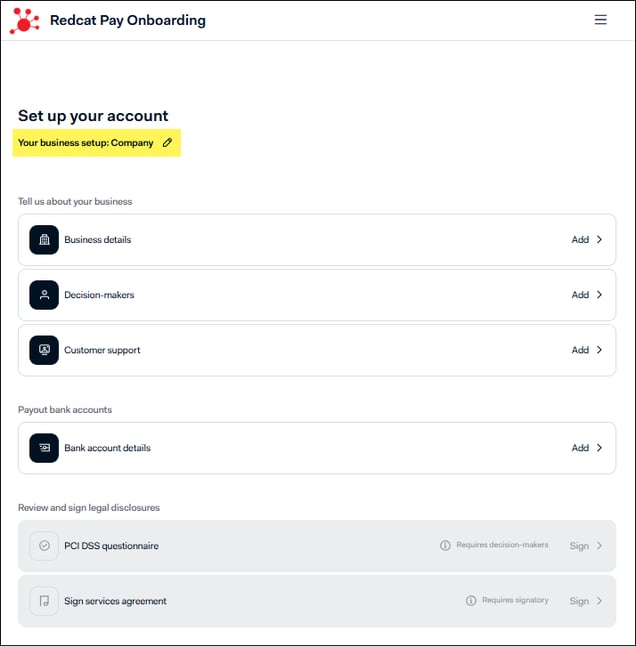
The onboarding form will default with Your business setup: Company.
-
If your legal entity is not a company, use the edit icon to make a different selection
each option will require slightly different details for verification
- Sole proprietorship
- Company
- Trust, partnership or association -
use the Continue button
use the Continue button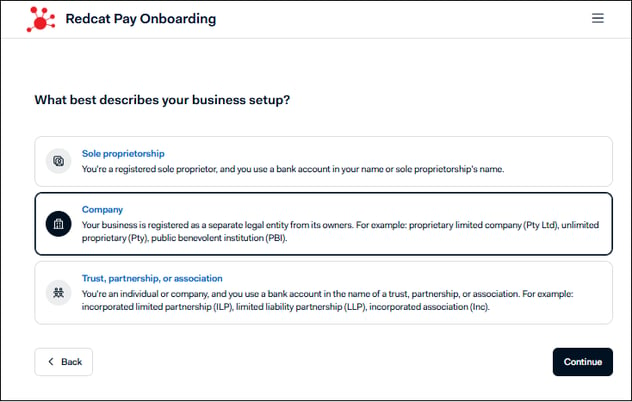
Paying different stores into different bank accounts
By default, one bank account is set up during onboarding and every store under that legal entity is paid out into it. For most businesses that's exactly what you want.
Some businesses need something different - a group where each site keeps its own takings, or a legal entity that runs stores under separate financial arrangements. Stores under the same legal entity can be paid out into different bank accounts. It's set up for you by Redcat rather than being a switch in the form, so there are a couple of steps.
What you need to know first
- Every bank account must be owned by the same legal entity you're onboarding. A payout account owned by a different entity would be expected to fail the ownership check described above. If your stores sit under genuinely separate legal entities, they'd need separate onboarding rather than multiple accounts on one entity.
- Each account goes through the same verification checks. Usually quick, but allow up to 48 hours in case it goes to manual review.
- The split is set per store, not per transaction. All of a store's sales, across every channel (POS, web, app and kiosk) go to the account assigned to that store.
How to set it up
1. Add each bank account through your onboarding link. Bank accounts can only be added by you, through the secure onboarding link. Add every account you want to use, not just the first one. If you've already finished onboarding, your original link may still work; if it has expired, ask Redcat to issue a new invitation.
The bank account must be verified before progressing to the next step.
2. Tell your implementations consultant which store goes with which account. Once your accounts are added and verified, send your implementations consultant a simple list - store name or location, and the account each one should be paid into.
| Store | Pay out to |
|---|---|
| Cats Coffee Cremorne | BSB 083-123, Acct 1234 5678 |
| Cats Coffee Fitzroy | BSB 083-123, Acct 8765 4321 |
They'll make the change in the payment platform and confirm when it's live. It isn't something you can switch over yourself in the onboarding form.
3. Check your first payout. When the first settlement lands after the change, confirm the money arrived in the accounts you expected. If anything looks off, flag it straight away rather than waiting for the next cycle.
Changing it later
Same path. Add any new account through your onboarding link, wait for it to verify, then let your implementations consultant know which stores should move across. Each store keeps paying into its current account right up until the change is made.
Review and Sign
Once your business and bank account details have been successfully entered, the section at the bottom to Review and sign legal disclosures becomes available.
PCI DSS questionaire
You will need to review and sign the PCI DSS (Payment Card Industry Data Security Standard) questionnaire.
PCI DSS is a global set of security requirements created by the major card schemes (Visa, Mastercard, etc.) that exists to keep card details safe. It sets minimum security rules for anyone that handles, stores, processes, or transmits card data. It is a card scheme requirement, not a Redcat Pay policy.
It is important to remember, within Redcat Pay:
- The Redcat Pay platform is powered by Adyen, who handles the sensitive card data
- the PCI scope for merchants is minimal
- businesses complete an annual online PCI questionnaire
this is standard for any business accepting cards
Sign Services Agreement
You will need to review and sign the Services Agreement as the final step in the onboarding process.
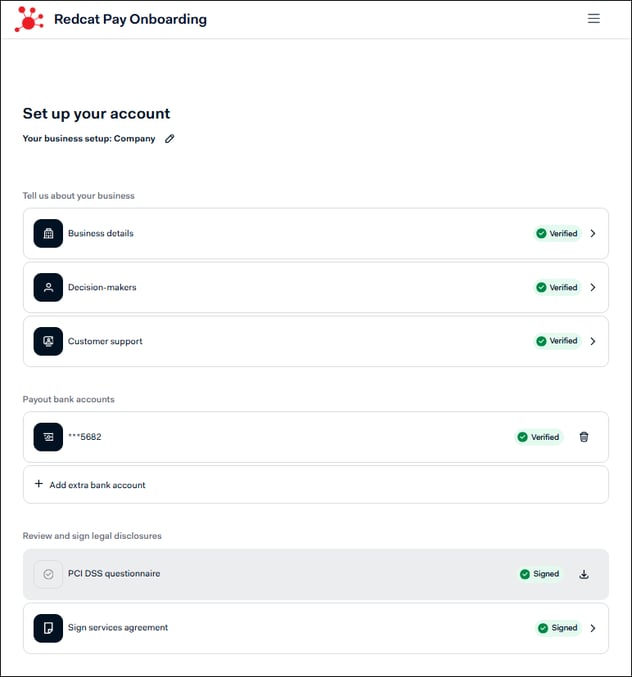
Congratulations! Your onboarding process is now complete.
Related Articles
More detailed information on Redcat Pay can be found in the following articles.
Article Change Log
| Date | Record of Changes | Author |
|
September 2026 |
Updated article to capture instructions for using |
A Crosland |
|
June 2026 |
First publication of this article. |
S Black |